 utoo-lint
Native at the core
Built in Zig, with Yuku parsing and semantic analysis. Lint files in parallel using prebuilt binaries for macOS, Linux, and Windows.
Made for real projects
JavaScript, TypeScript, React, accessibility, and import rules. Use familiar rule IDs and severities, with safe autofix where supported.
Ready for your workflow
Typed or JSON configuration, suppression comments, and JSON diagnostics. Use the CLI, JavaScript API, or in-memory WebAssembly package.
function greet(name: string) {let message = `Hello, ${name}`;;const messages = new Array(message, 'Welcome');return { messages: messages };}
More feedback. Less waiting.
The same TypeScript corpus. The same 12 shared rules. Every sample starts a fresh CLI process, including startup time.
Every millisecond counts.
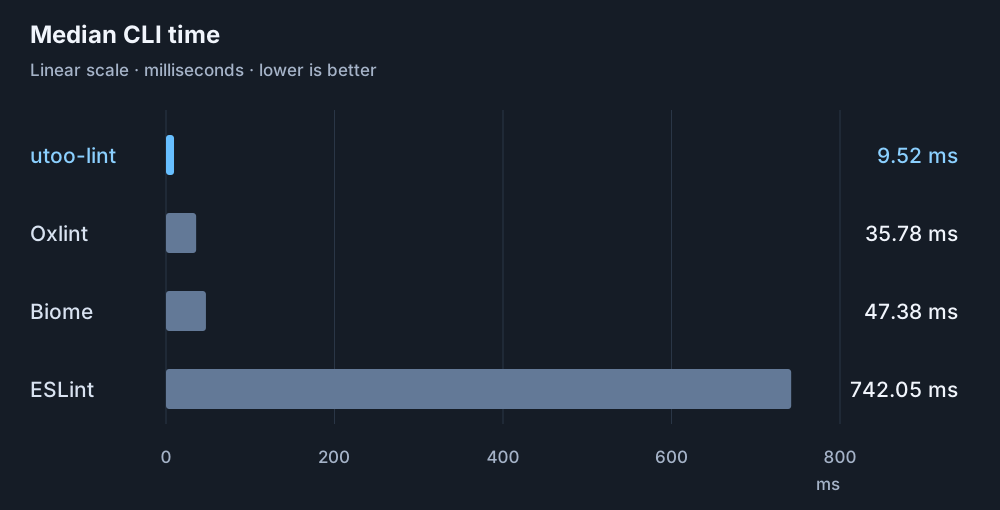
A recorded run on one generated workload. Results vary with hardware, code, and enabled rules. The archived report documents the environment and comparison limits.
Your rules. In your language.
Start with the frontend preset, then adapt it to your project. Typed configuration brings editor completion; static JSON works when you need a data-only config.
- ESLint-style rule names and severities
- File patterns, global ignores, and flat config arrays
- Presets you can extend and override
import { defineConfig } from '@utoo/lint/config';import frontend from '@utoo/lint/configs/frontend';export default defineConfig({...frontend,rules: {...frontend.rules,'no-console': 'warn',},});
Start small. Migrate with confidence.
Bring over supported rules at your own pace. The migration report shows what can move and what still needs ESLint.
Inspect your config
Preview the migration before writing files. Review the report for unsupported options and plugin behavior.
utoo-lint migrate eslint --printMove supported rules
Check coverage for the rules your project uses. Keep unsupported processors, custom plugins, and type-service workflows in ESLint.
Check rule coverage →Verify in your project
Run both tools in CI and compare diagnostics. Remove duplicate ESLint coverage as each rule is verified.
Read the migration guide →
From your repository to the browser.
Native CLI
Lint your source tree and apply supported fixes, locally or in CI.
pnpm exec utoo-lint srcUse the CLI →JavaScript API
Integrate linting into Node.js tools with ESM and CommonJS entry points.
@utoo/lintConfigure your project →WebAssembly
Lint and fix one in-memory file. The Playground processes code locally in your browser.
@utoo/lint-wasmExplore WebAssembly →